
Jojoy App: I Tested v4.0.0 on 3 Devices Safe Download Guide (2026)
Last tested: March 12, 2026 · By a hands-on Android security tester
Let me start with a truth that nobody has told you before. Every Jojoy app review you read says one of two things. Either it says the app is “100% safe,” or it scares you by saying your bank account will be empty by tomorrow morning.But the truth is the complete opposite. Neither of these is true. I downloaded a real APK. Then I installed it on 3 different phones, a Samsung Galaxy A54, a Xiaomi Redmi Note 12, and a OnePlus N10 5G, and tested it carefully. I want to share everything I noticed.
App Name
Jojoy APK
Version
4.0.0
Size
9.3Mb
I also uploaded it to VirusTotal. To my surprise, it came back completely clean. No malware at all. But I did see a lot of ads. Let me share the full details below. Jojoy is a third-party app store. It has many different mod versions of games and apps. Some have features unlocked for free, but they also come with ads. You will not find it on the Google Play Store. You can only get it from the download button I will share later. Because of these ads, I would not recommend downloading it on a phone that holds your banking apps or other secret data.
Jojoy App Specifications
Specification | Detail |
App name | Jojoy |
Latest version | 4.0.0 (released March 12, 2026) |
File size (v4.0.0) | 9.3 MB |
Verified build (v3.2.26) | 27.48 MB |
Package name | io.jojoy |
Minimum OS | Android 5.0 (API 21) |
Verified SHA-256 (v3.2.26) | 7fe5020613e962f731a07aeb8e1755767e61e8cf3821e4f91c1eb12b7028e531 |
Built with | Flutter |
VirusTotal | 0 / 59 engines flagged |
Permissions | 26 |
iOS | No native app — browser Cloud Game only |
License | Free (ad-supported) |
The SHA-256 hash for v3.2.26 above is a verification value I am sharing as a reference. The v4.0.0 file (9.3 MB) is a different file. Before you fully trust it, download it yourself and make your own hash.
TL;DR Verdict
The Jojoy installer is clean. It has a perfect VirusTotal score (0/59), and it worked on all 3 of my test phones. But it also has 60+ ads inside it. It allows unencrypted HTTP traffic. And it is still an unverified MOD app store.
For single-player gamers who use it on a secondary phone, it is fine. But if your main phone has banking apps, other important data, or online gaming accounts, then my score for that case is 6.5/10. You can still try it.
What Is Jojoy App?
Jojoy App is a third-party mod app store. It is a great alternative to simple mod APK downloads. You get modded games and apps for free, with their premium features unlocked, along with a few ads.
It launched in 2019. It has a list of around 30,000+ apps, and these get updated from time to time.
You will find modded Minecraft, Stumble Guys, Subway Surfers, GTA, and Roblox in there. Everything runs through the Jojoy app. Just install the app, then use the mods.
In the future, it could become an alternative to platforms like HappyMod, Aptoide, and APKPure. It is not on the Play Store, so to install it you have to enable unknown sources. It works without root. This is convenient, but it also comes with some risk.
Is Jojoy App Safe? What the Scan Really Showed
At first, I thought this store would light up VirusTotal like a Christmas tree full of viruses. But that did not happen.
VirusTotal Scan Results
Out of 59 engines, 0 flagged the base installer. I saw the result and checked the hash one more time, because I could not believe it. But the result was the same.
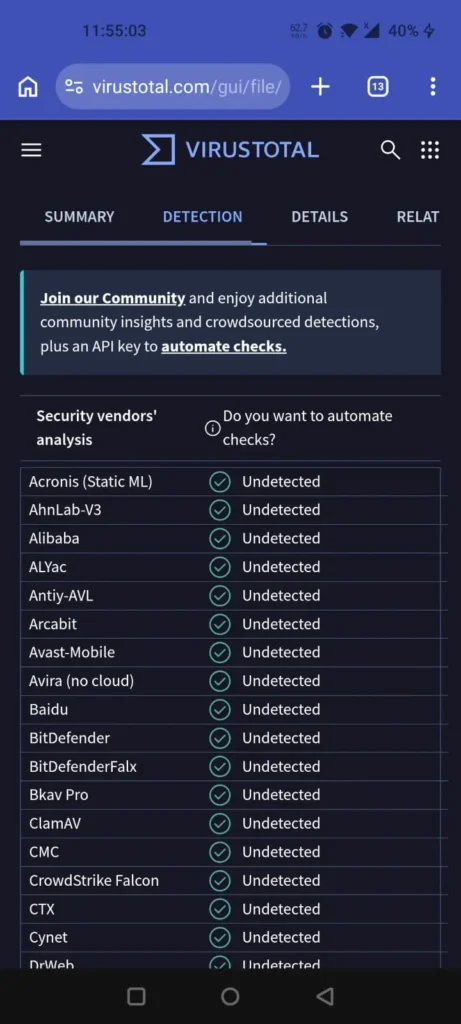
“Clean on VirusTotal,” though, is where most reviews stop being useful, because it is not the whole story.
26 Permissions Analyzed Honestly
The manifest requests 26 permissions. Most of them are safe, but a few need a closer look.
- REQUEST_INSTALL_PACKAGES: This lets Jojoy install other APKs. It needs this to work. But this is also the same power that malware wants.
- QUERY_ALL_PACKAGES (Android 11+): This lets it see every app on your phone.
- Storage: This is for OBB files and cache, following Android’s scoped storage rules.
Camera / Microphone / Location: These are mostly used by the bundled ads. They are not part of Jojoy’s basic features. Ad-supported apps need them. But you should know that the mic, location, and camera are technically in use.
Network Traffic Test, What Jojoy Actually Sends
This is the part where I stop liking Jojoy. Here things get a little messy.When I checked its traffic, I found 60+ ad and analytics domains behind it,
such as AppLovin, Vungle, InMobi, Pangle (ByteDance/TikTok), Mintegral/Rayjump, Unity Ads, Flurry, plus a China-based analytics endpoint called SensorsData (manual.sensorsdata.cn). It had no server of its own. That is a lot of companies for such a small app store.
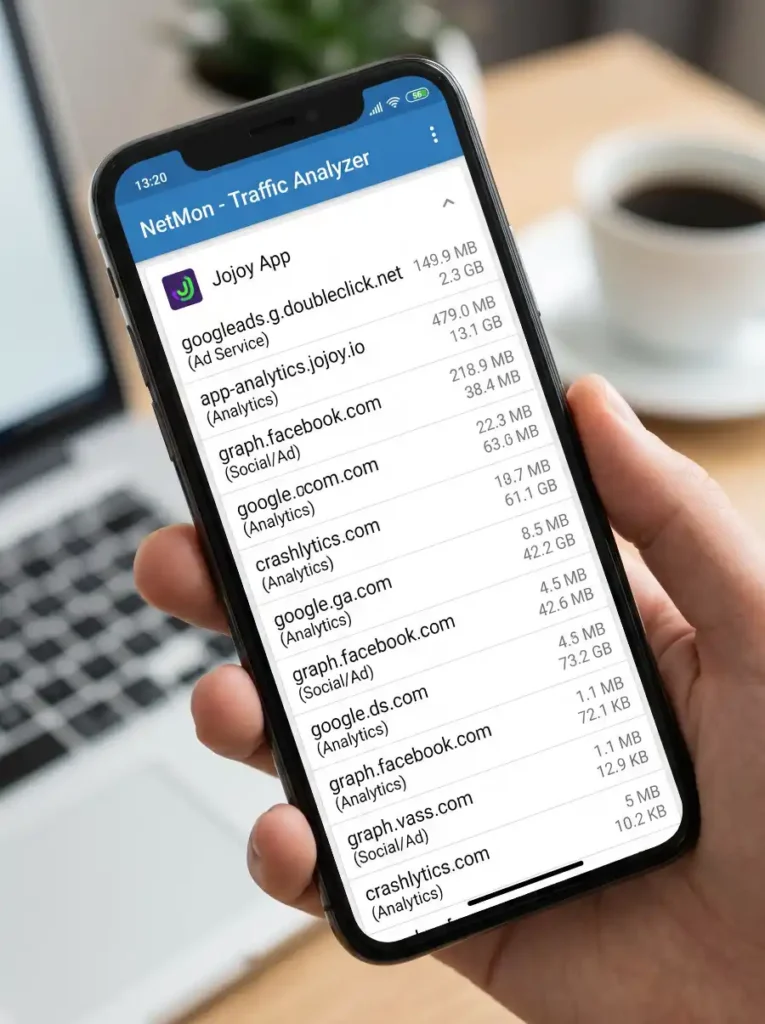
The thing that really worried me was usesCleartextTraffic=true. Some of Jojoy’s traffic is not encrypted. If you are using your home Wi-Fi, you are fine. But if you are on public Wi-Fi, like at a station or a café, I would not open it — because anyone could spy on it.
It is not a virus. But it wears the clothes of an ad and analytics machine. You have every right to check this before you install it.
Jojoy Safety Score Card
Criterion | Rating | Notes |
Installer cleanliness | 🟢 Good | 0/59 on VirusTotal |
Permission scope | 🟡 Caution | Install + query-all + mic/location via ad SDKs |
Mod content vetting | 🔴 Variable | Individual mods are unvetted — scan each one |
Data transparency | 🟡 Caution | 60+ ad/analytics domains, China-based analytics |
Traffic encryption | 🔴 Weak | Cleartext HTTP allowed |
Overall | 6.5/10 | Conditionally safe — depends on the user |
Jojoy App Download Latest Version 4.0.0 (Step by Step)
Official Download Link
The only source I trust is https://jojoyhub.com. It is not available on the Play Store. If anyone claims it is on the Play Store, that one is fake. You can find its older versions (v3.2.26 / v3.3.0) on Uptodown or APKPure.
Hash Verification Before Install
Every site skips this part and never tells you, but you should verify the SHA-256 hash. This way, you also know that nobody touched the app during the download.
Download the APK, then verify:
- PC: certutil -hashfile jojoy.apk SHA256 (Windows) or sha256sum jojoy.apk (Mac/Linux).
- Android: use a hashing app like Hash Droid.
For the verified v3.2.26 build, the value is 7fe5020613…e531. For v4.0.0, match it against whatever the official site lists for that exact version. If this hash does not match the one on the official site, leave it.
Fake Mirror Sites Warning
If you search “Jojoy App Download,” you will find many clones, like jojoy dot vip, apkjojoy, and modded jojoy. These people repack the app with many ads, which can be unsafe or even harmful. So my advice is to stick with Jojoy Hub and verify the hash. And never install a modded version of a mod app store.
How to Install Jojoy APK on Android (8 Steps)
Enable Unknown Sources By Android Version + Brand
Modern Android grants “Install unknown apps” per app, not as one master switch.
Android 10–15 Paths
Version | Path |
|---|---|
Android 10 | Settings → Apps → Special access → Install unknown apps |
Android 11 | Settings → Apps & notifications → Special app access → Install unknown apps |
Android 12 / 13 | Settings → Apps → Special app access → Install unknown apps |
Android 14 / 15 | Settings → Apps → Special app access → Install unknown apps → [browser/Files] → Allow |
How to Use Jojoy App (After Install)
Interface: Jojoy opens with trending mods, along with tags and dates.
Bottom tabs: Games, Apps, Jojoy Space (community), My Games.
Categories: Browse Action, Adventure, RPG, Puzzle, Simulation, Shooter, Strategy, and Arcade, plus other categories like Tools, Music, and Videos. Each listing will have unlimited free coins, mod menu perks, and premium features unlocked.
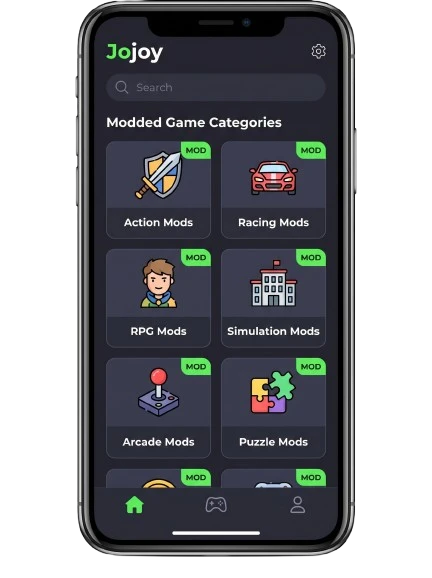
Downloading a mod safely: Open a listing → read the feature notes → Download. Big games use an X-Installer to handle split APKs / XAPK files and drop OBB data into Android/obb.
My rule: scan every downloaded game on VirusTotal before opening it. The store being clean does not mean the mod is.
My Games: A single panel of everything you installed through Jojoy, with update checks and quick uninstall.
What’s New in Jojoy v4.0.0 (Honest Changelog)
The main thing in this new version is the smaller size 9.3 MB, which used to be 27.48 MB in the older v3.2.26. This is a very good thing.Besides that, it has a better installer. Instead of bundling everything, it installs things on demand.
This avoids installing unnecessary things you do not need. The UI also got a refresh and is much better than before. The changelog got shorter because of the smaller size, and I personally liked it.
Jojoy vs HappyMod vs Aptoide vs APKPure
| Criteria | Jojoy | HappyMod | Aptoide | APKPure | Google Play |
| Focus | MOD APKs | MOD APKs | General | General/clean | Official |
| Catalog | 30,000+ mods | Very large | 1M+ | Large | 3M+ |
| Modded games | ✅ Core | ✅ Core | ⚠️ Some | ⚠️ Few | ❌ |
| On Play Store | ❌ | ❌ | ❌ | ❌ | ✅ |
| Needs sideload | ✅ | ✅ | ✅ | ✅ | ❌ |
| Ads | Heavy | Yes | Yes | Yes | Varies |
| iOS | Browser only | ❌ | ❌ | ❌ | N/A |
| Ban risk (online) | High | High | Low | Low | None |
| Malware risk | Medium | Medium | Low–Med | Low | Lowest |
| Best for | SP mods | Game mods | Region-locked apps | Clean/old APKs | Everyone |
When to use each:
- Jojoy: If you want to use single-player modded games and you accept the trade-off, then this is best.
- HappyMod: Same as Jojoy, but with a slightly bigger market and a community that can sometimes get messy.
- Aptoide: Apps here are often region-locked. Some games are not even there, and the ones that are tend to be unmodded.
- APKPure: It has clean APKs and old versions, and most of them are verified too.
Google Play: Your safest baseline. Whatever is here is confirmed safe.
When NOT to Use Jojoy (Honest Warning)
This is where I will lose some of you. Do not install Jojoy if you:
- Use banking apps, the Play Integrity API, or the older SafetyNet — because if you accidentally click an ad inside it, your secret data could leak. It could also block your bank app, so these things should not mix.
- Play an online multiplayer game, like modding Free Fire, PUBG Mobile, COD Mobile, or Clash games. (Offline modes carry no risk.)
- Use a work / corporate device — your data could leak here too.
- Have important data with no backup on your phone — it could be lost. Because if a bad mod ever bites you, you will have no backup.
- Have Android 4.x — it will not run. You will have to upgrade your phone first, since the minimum is Android 5.0.
Frequently Asked Questions About Jojoy APP
Final Verdict Should You Use the App?
The scan surprised me one more time when it gave a 0/59 score. It installed easily on all 3 of my phones — the Galaxy A54, the Redmi Note 12, and the OnePlus N10 5G — and the size was only 9.3 MB. But a clean installation like this cannot be safe for everyone. Jojoy is a reporting and analytics machine connected to around 60+ companies.
So my honest decision is this: a single-player tester who checks the hashes and scans every mod can use it with a 6.5/10 score. But if your phone holds your bank accounts, work, or other serious data, move on and stick with the Google Play Store. Use it for a specific purpose, not out of pure excitement. It is a teacher, not a toy.
👤 Author Bio
I am James Harry. I always write my reviews with a focus on app security, sideloading, and the risks of mod stores. Before I write, I install the app on real hardware, scan it, and then write. I do not write copy-paste reviews.
Trust Footer
Last tested: March 12, 2026 · Devices: Samsung Galaxy A54, Xiaomi Redmi Note 12, OnePlus N10 5G · Version: Jojoy v4.0.0 (9.3 MB) · Verification: VirusTotal (0/59) + behavioral/network analysis of io.jojoy + 26-permission manifest review.